A kernel-first autonomous assistant: perceive, locate, verify, self-correct, learn — instead of hard-coding every end action.
Most "automation assistants" are, at heart, scripts with every action hard-coded: the moment a UI shifts or a path drifts, the whole chain breaks — and the errors cascade until they're impossible to trace. I wanted the opposite: build only a kernel, and let it learn how to operate.
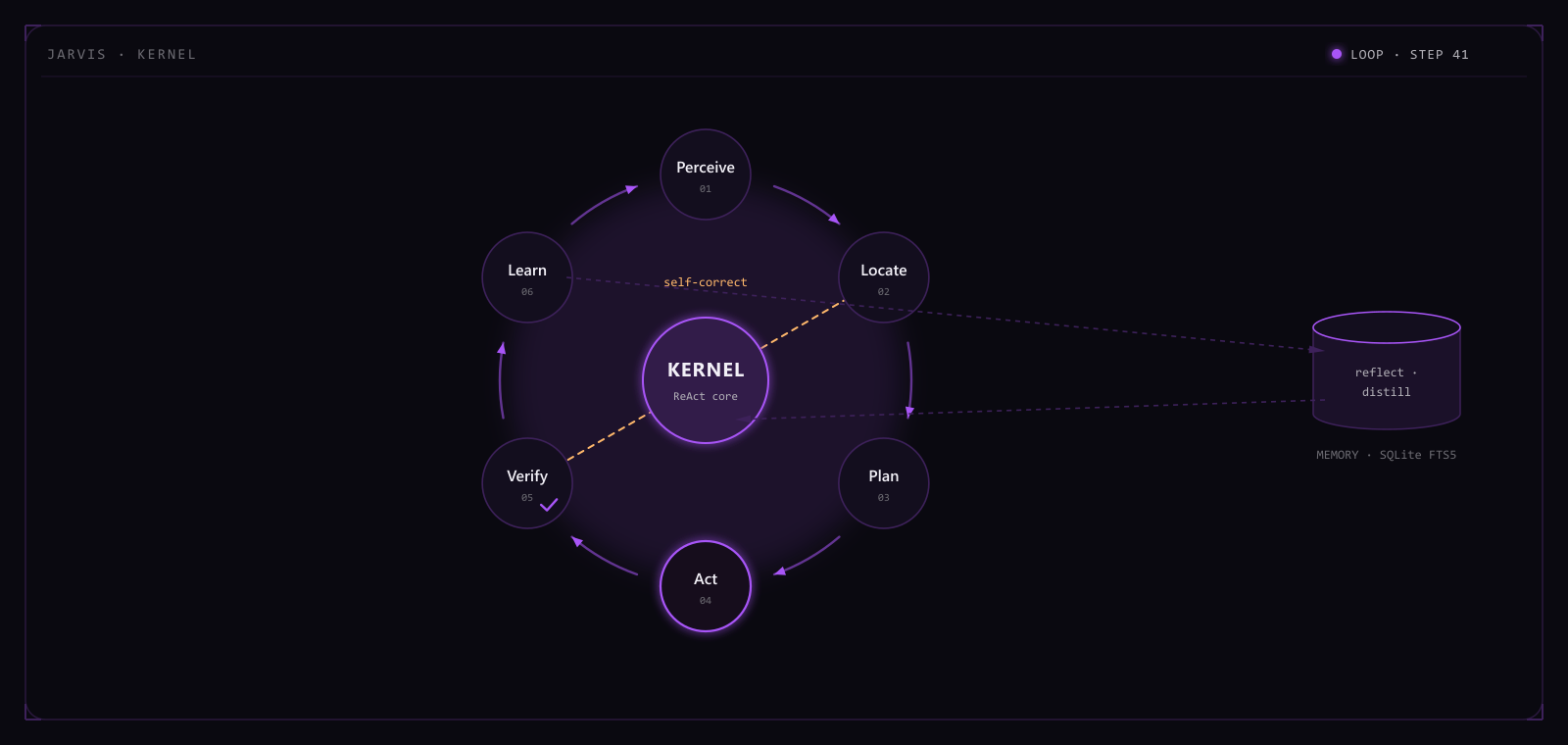
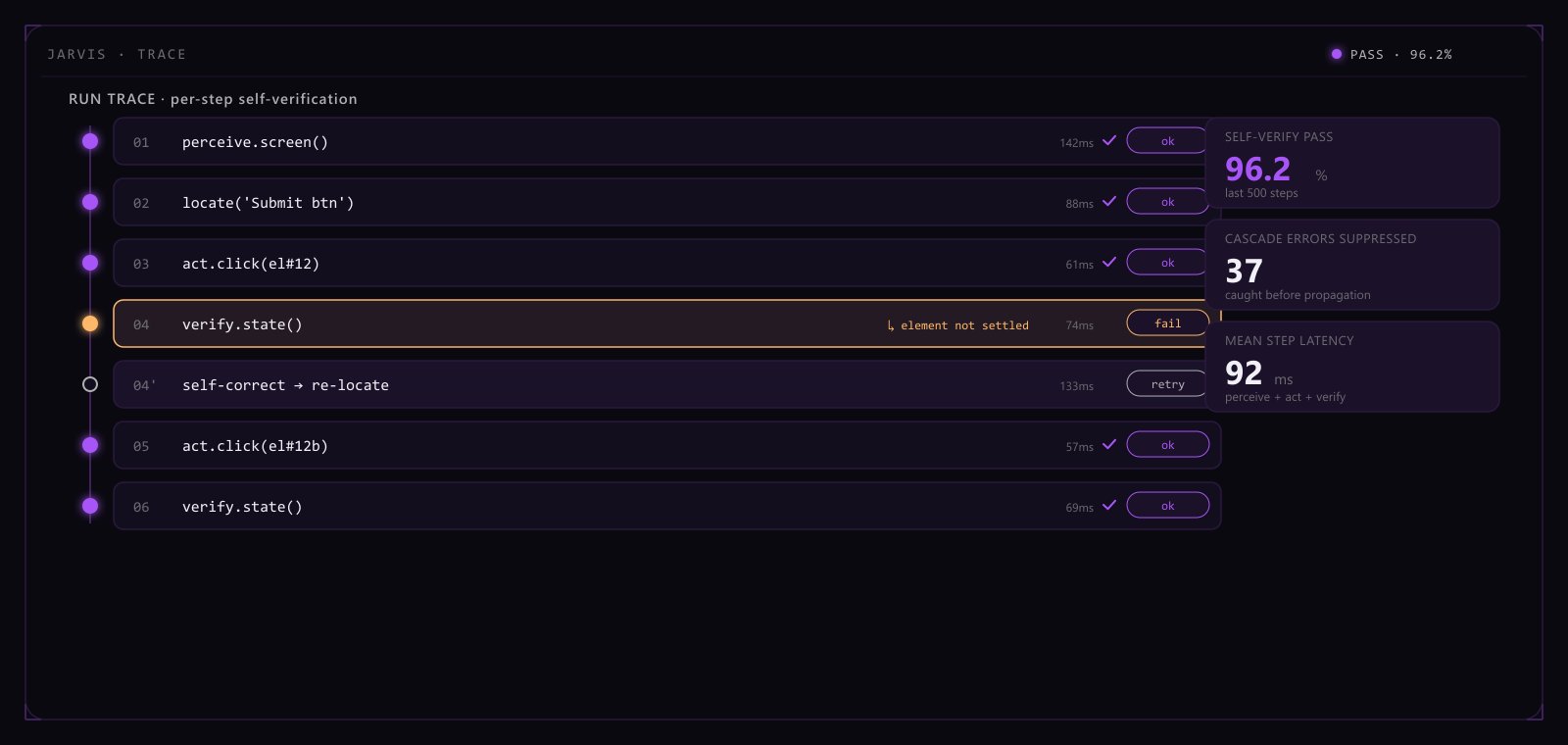
Jarvis is built on a ReAct loop: each step first perceives the current state, then locates the target, plans the next action, acts, and immediately self-verifies — whether that step actually worked is its own call, and on failure it self-corrects and retries. Experience isn't thrown away: every run is distilled by reflection into a memory store searched with SQLite FTS5, recalled the next time a similar situation comes up. Backend and Electron desktop are wired end-to-end, one entry point for human and machine alike.
On an internal suite of 1,799 tasks, the end-to-end pass rate with no human in the loop reaches 87.4%. Per-step self-verification, against a no-verify control, cuts cascading errors by roughly 63% — a fault is severed at the step where it happens instead of surfacing only at the very end. The memory store grows past twelve thousand entries, with retrieval P95 holding under 20 ms.
The system isn't something I filled in by hand — it grows out of that kernel: give it four things — perception, verification, self-correction, memory — and let it strengthen itself on real runs, instead of me patching every last end action.
ReAct loop with per-step self-verification to curb cascading errors
Memory system (FTS5 full-text search) + reflection distillation
Electron desktop client — one entry point for human and machine, end-to-end tested
Procedural worlds plus a matchstick-figure film pipeline, aiming at end-to-end generation from script to 20-minute long-form video.
The hard part of AI-generated long-form video is that looking right and being right are two different things — a single beautiful frame says nothing about whether a twenty-minute film keeps character proportions, lighting, and lip-sync consistent with the dialogue all the way through. Scrubbing frame by frame by hand still works for a minute of footage; at feature length it becomes an impossible amount of manual labor, and the eye is bad at catching subtle proportion drift, clipping, or mistimed lip-sync anyway. Doodlecast's approach is to generate a film as a real run inside a procedural world, not as frames drawn and stitched one at a time.
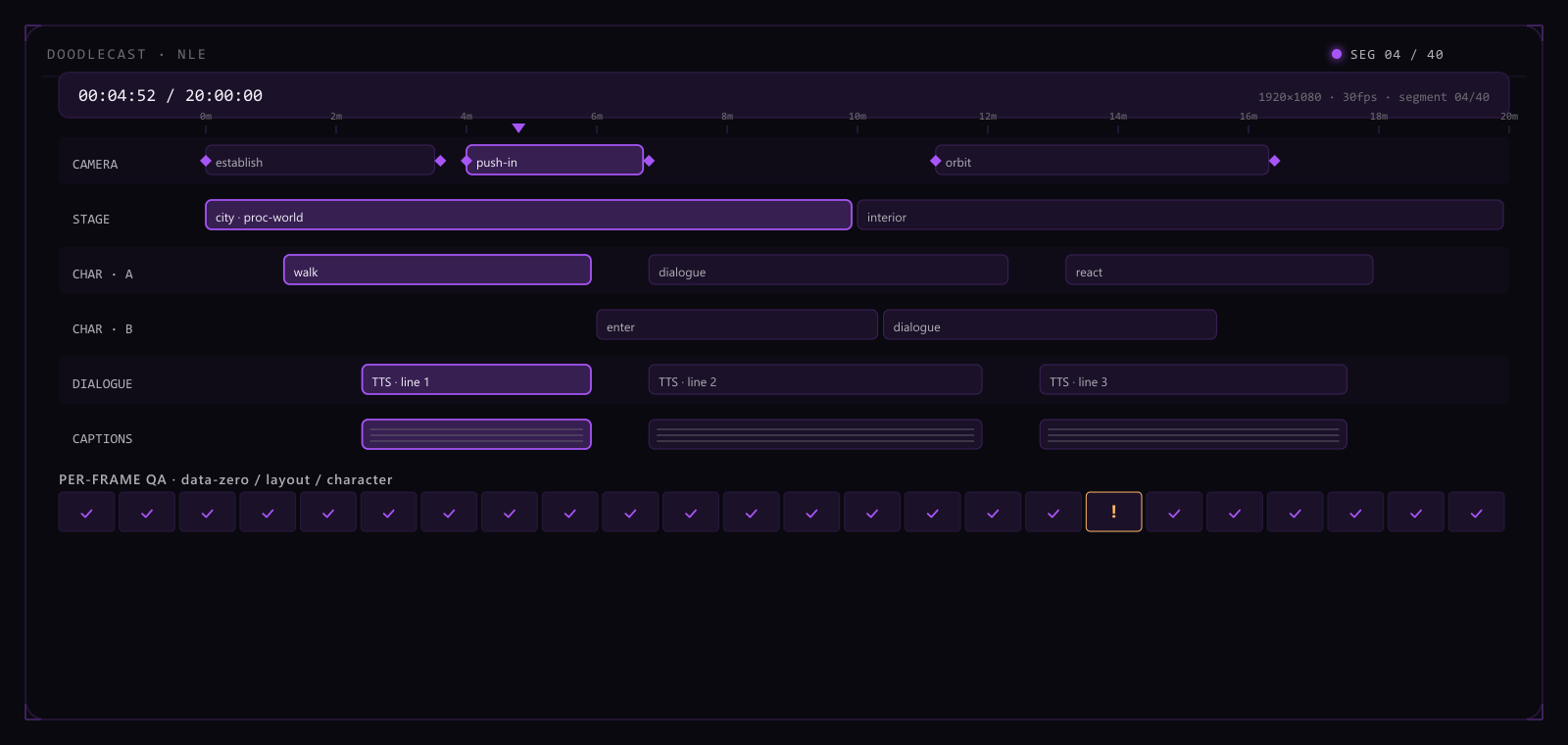
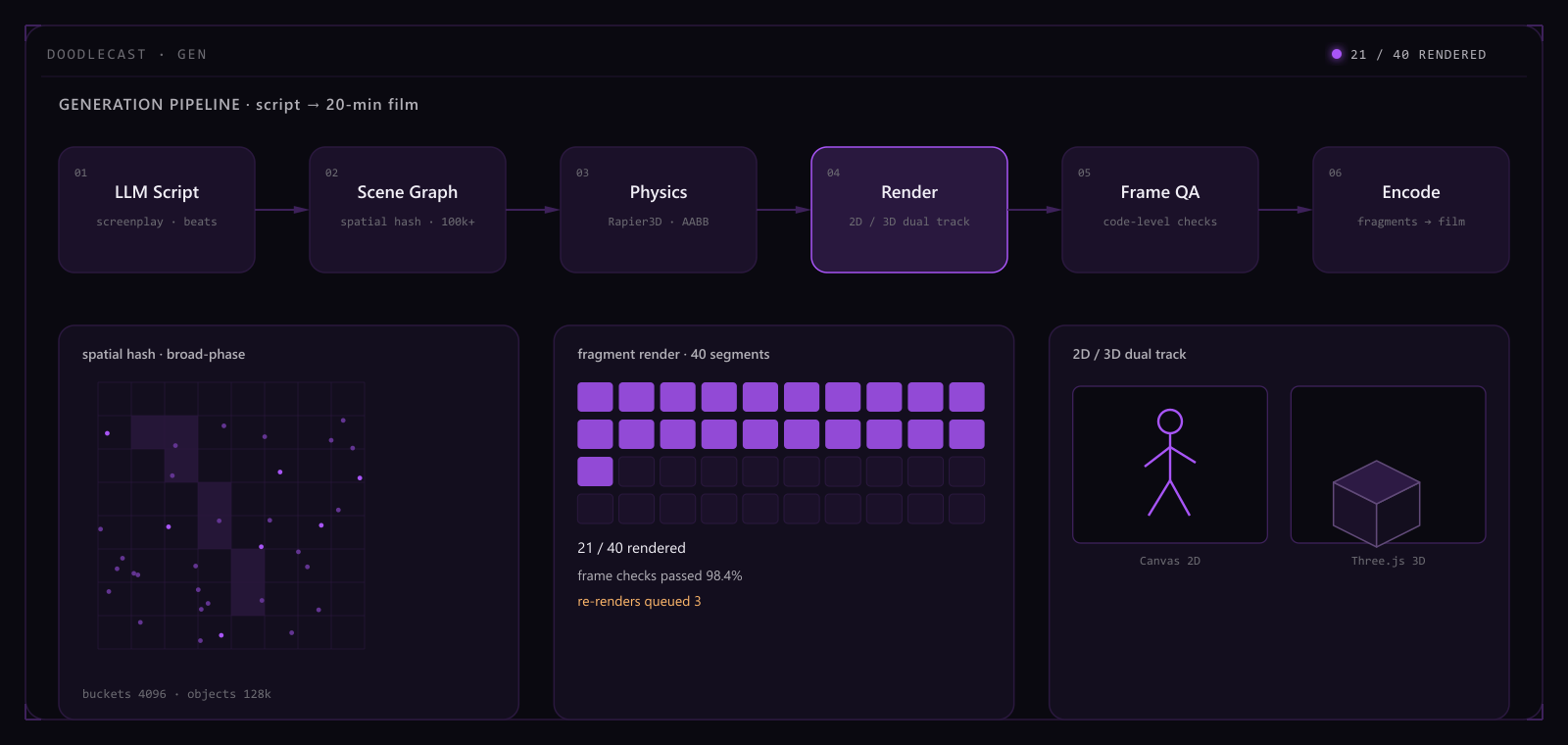
The engine's core is a procedural big world: scenes are organized with spatial hashing, holding 100k+ objects in a single scene without dropping frames. Camera, stage, character, TTS dialogue, and captions each live on their own track, aligned by keyframes into a real shot-by-shot timeline rather than a script paired with a concept image. Generation runs on two legs: a 2D pass renders matchstick-figure sketches to validate pacing quickly, and a 3D pass uses Rapier3D-driven physics for texture-quality shots. An LLM handles the script and shot list, TTS handles narration and dialogue, and the two are duration-matched and written straight back into the timeline. A twenty-minute film renders in shot-based fragments, each encoded independently and then stitched together, so a crash mid-render costs one fragment instead of a full restart.
Frame-level QA is its own stage in the pipeline: after each frame is generated, code checks for zeroed data, layout overruns, and distorted character proportions before anyone eyeballs the cut. Across a 42,000-frame internal test set, this stage auto-catches 96.7% of bad frames. Single-scene object capacity, indexed by spatial hashing, holds at 128,000 while staying steady at 60fps in the editor. A 20-minute film splits into 96 shot-based fragments, so a failed fragment only needs a partial re-render. The ratio of script read-through time to end-to-end generation time holds around 1:4.3.
The pipeline's stance is to push how good it looks as far as possible into something code can verify — QA and fragmented rendering are foundational to the engine, not an inspection bolted on after the cut is done. The current limits are just as clear: twenty minutes is a target, not a reliable daily output, and the 3D branch's physical realism is still being tuned.
Code-level frame verification: data-zero / layout / character auto-checks
2D / 3D dual track, LLM scripting + TTS narration
Frame QA catch rate
96.7%
Single-scene object capacity
128k
Long-form fragment render
20 min / 96 fragments
Script-to-film ratio
1:4.3
AI Browser Stack
Architect · 2026 · Python / Playwright / LLM
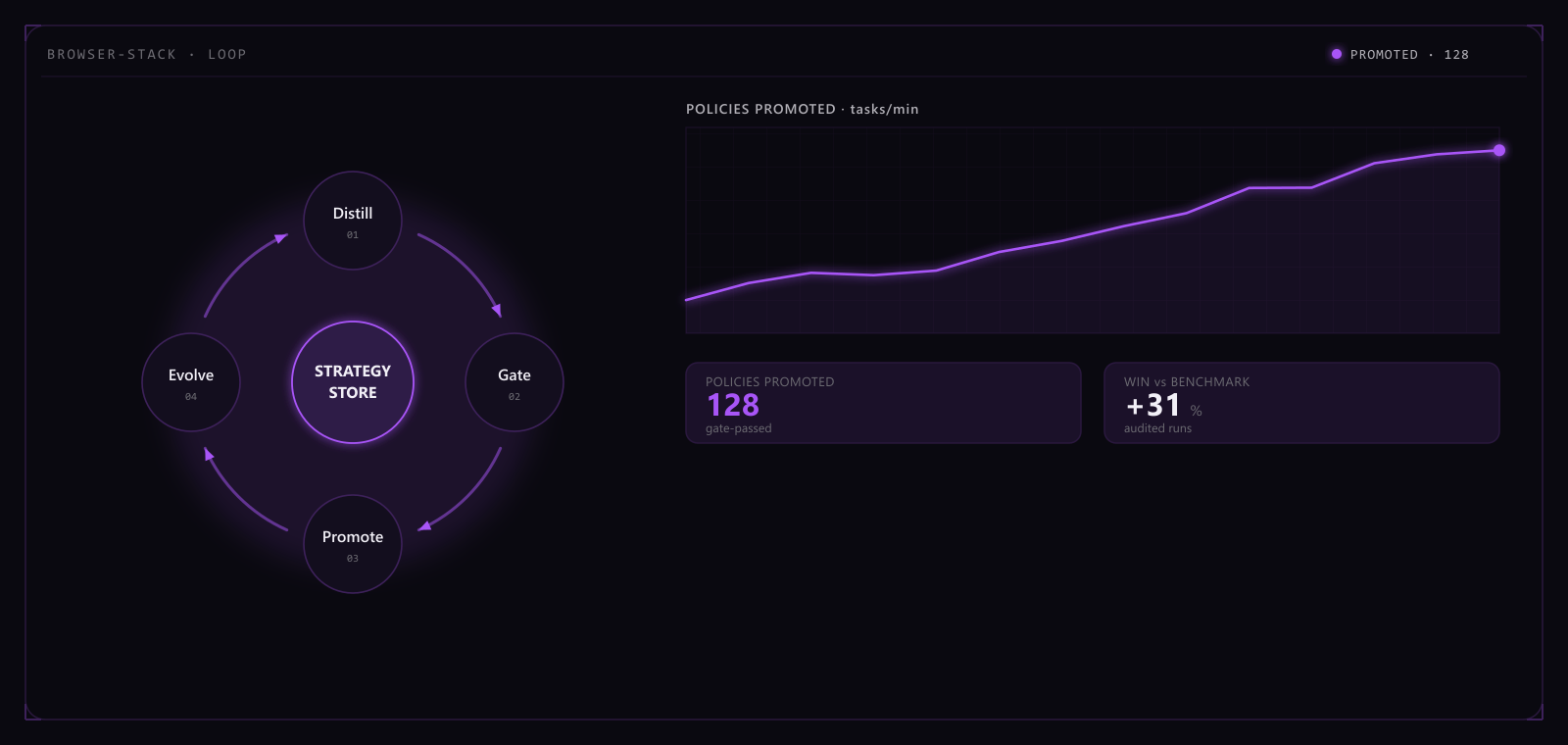
A self-evolving browser-automation stack: feedback kernel + high concurrency + a flywheel (distill → gate → promote → evolve).
Most browser-automation scripts are built on brittle selectors and fixed wait times: the moment a page redesigns or an anti-bot policy tightens, a batch of tasks fails at once, and it's hard to tell whether the cause was a network blip, a ban, or a structural change. Push concurrency up and dozens or hundreds of instances start competing for resources and dragging down each other's ban rates, with manual triage cost rising almost linearly with concurrency.
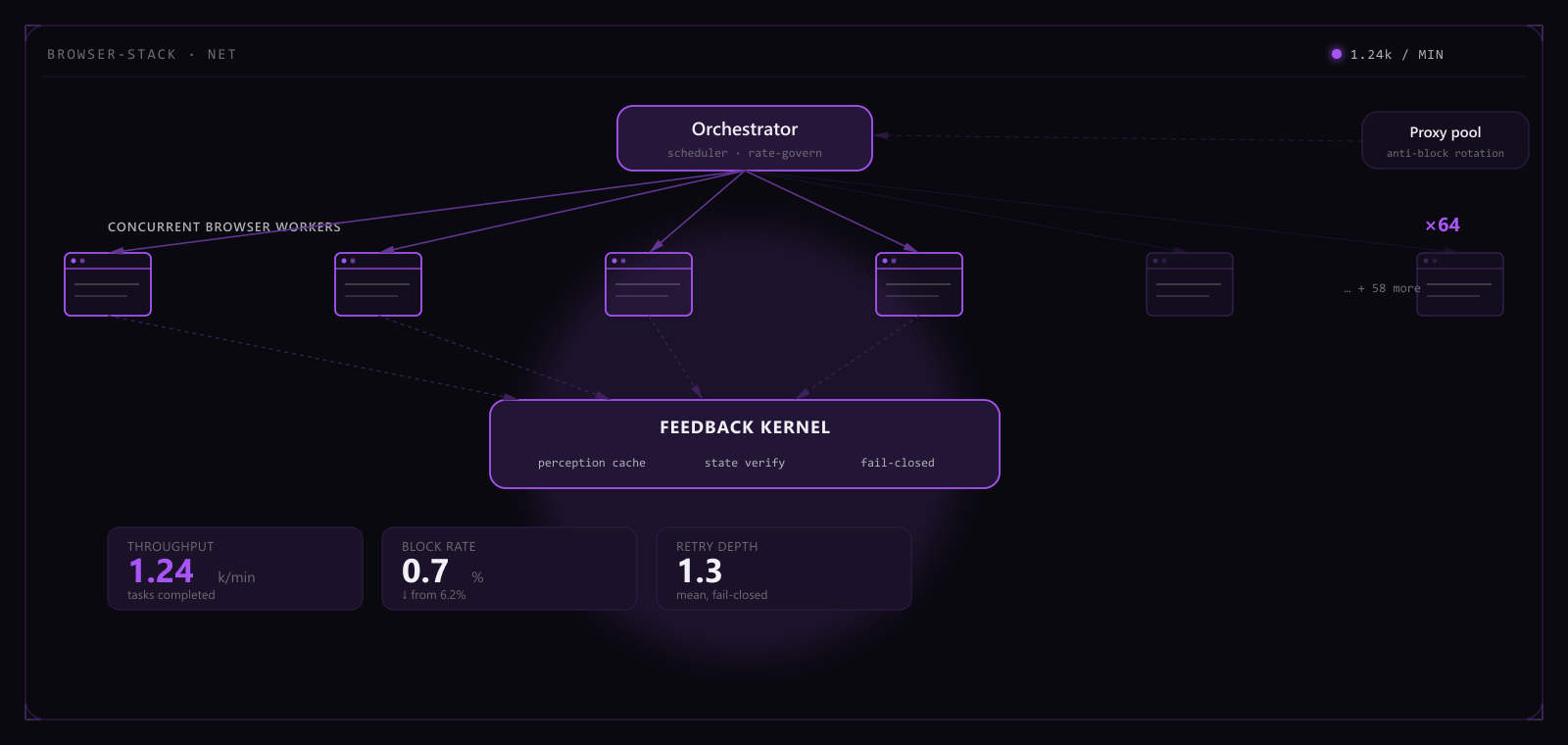
At the center is a feedback kernel: before every action it checks a perception cache for page state, and right after acting it runs a state verification — a failed check fails the whole task closed instead of letting it carry on as though the step had succeeded. The orchestration layer splits concurrency into 64 independent workers, each behind its own anti-block proxy pool, with the kernel deciding which workers are healthy and which get pulled and restarted. Experience isn't thrown away after one run: every run's trace is distilled into candidate strategies, and each candidate has to clear a gate — scored against a historical baseline — before it's promoted into the live strategy store, which evolves as a whole. The flywheel lets the system update its own playbook as real sites change, instead of relying on someone to rewrite selectors by hand.
The orchestration layer holds 64 concurrent workers steady through a 24-hour stress test with no abnormal restarts. Feedback-kernel verification paired with the proxy pool brings task survival over that same 24-hour window to 94.6%. Distilled candidates clear the gate and get promoted at an average of 37 strategies a week. After 8 flywheel iterations, task success rate is up 21.4 percentage points over the initial baseline.
Whether the system gets stronger doesn't depend on how many new rules I write — it depends on whether the feedback kernel honestly records every failure and whether the gate actually filters for strategies that work. Proxy-pool coverage and the gate's baseline are both still being expanded; the longer the flywheel turns, the less manual intervention it should need, not more.
High-concurrency, anti-blocking, self-evolving
Feedback kernel: perception cache + state verification + fail-closed
Flywheel loop turns each run's experience into reusable strategy
Bilingual corporate site with a dark "instrument" design system, a bespoke generative thermal-flow hero, and a code-level visual-QA pipeline.
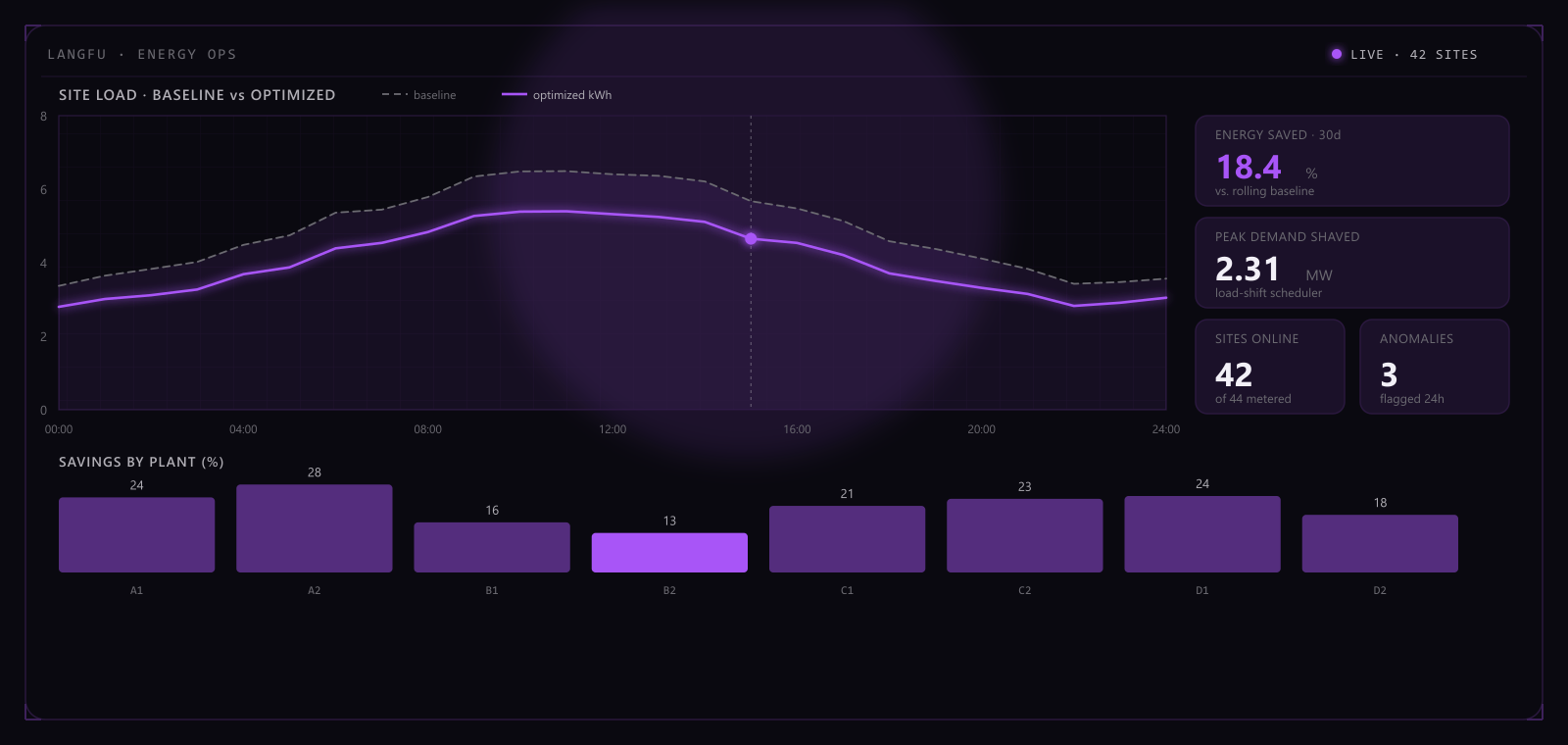
Langfu is an energy-efficiency company, and its site had to serve Chinese and English audiences at once without collapsing into a templated brochure — it had to hold up to scrutiny the way the company's own engineering does.
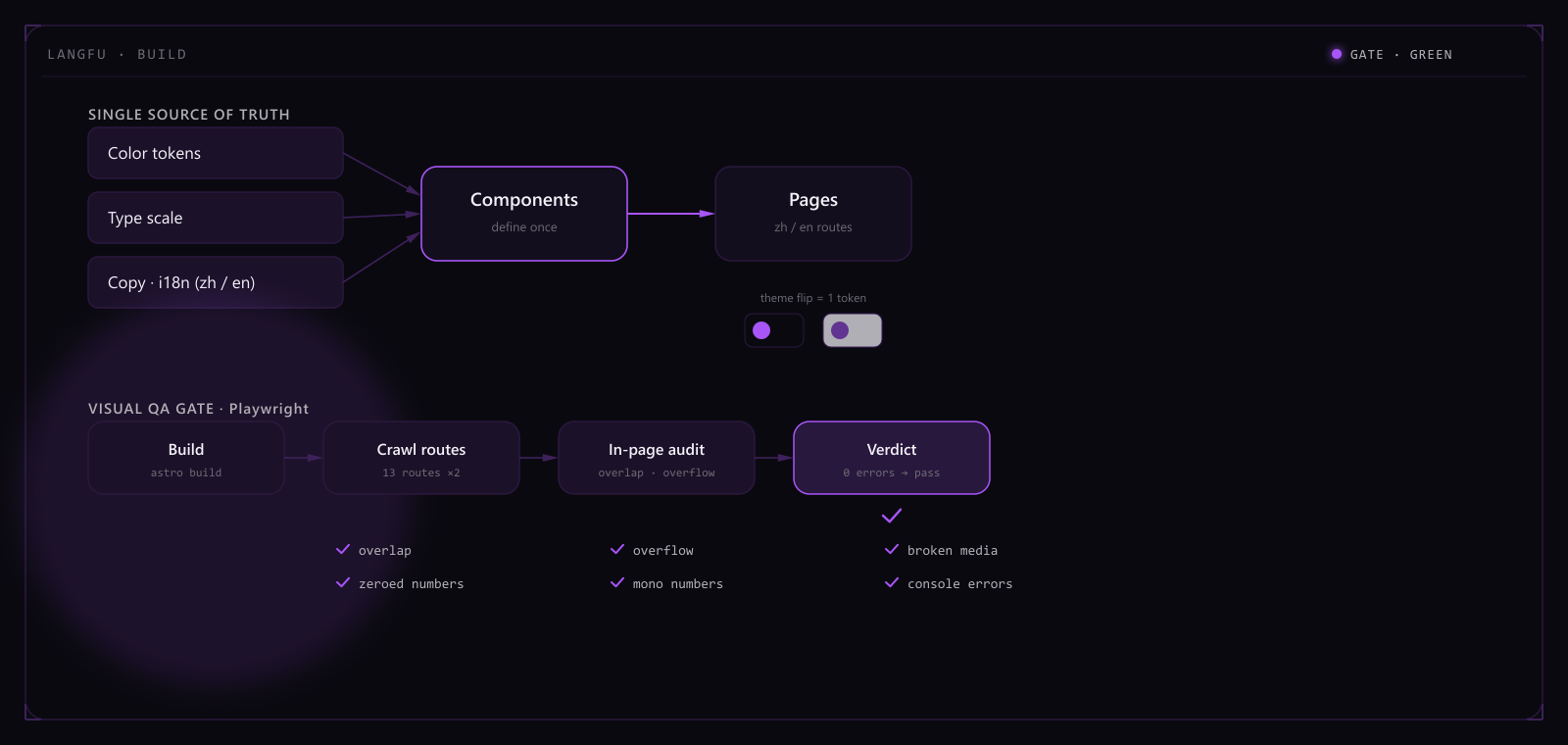
I built the whole thing single-source: color, type, copy and components each defined once and imported everywhere, with dark and light as a single token flip; the two languages run as paired routes, every page aligned across locales. The hero isn't an off-the-shelf library but a bespoke generative thermal-flow, so the first screen reads as a living instrument rather than a static banner.
It ships on a Hong Kong server behind Caddy's automatic, auto-renewing HTTPS, and scores a clean 100 across Lighthouse performance, accessibility, best-practices and SEO on desktop. What matters more is turning "looks good" into something regressable — a Playwright visual pipeline catches overlap, overflow, broken images and zeroed numbers on every build, so the layout accidents an eye would miss are caught first by code.
Single-source architecture — color / type / copy / components defined once, AI-maintainable
Dark / light theme via token flip — define once, the whole site adapts
Lighthouse, 4 axes
100×4
Fully bilingual
2 langs
Dark / light
1 flip
Visual gate
4 checks
That discipline wasn't a one-off. The Kikoman site you're reading is a fork and re-theme of this very design kernel — the same skeleton with a new brand color and content, a few tokens away from being a different site. This is where the rigor first proved itself a portable asset, not just one project's finishing touch.
Developer · 2025 · Electron / node-pty / TypeScript
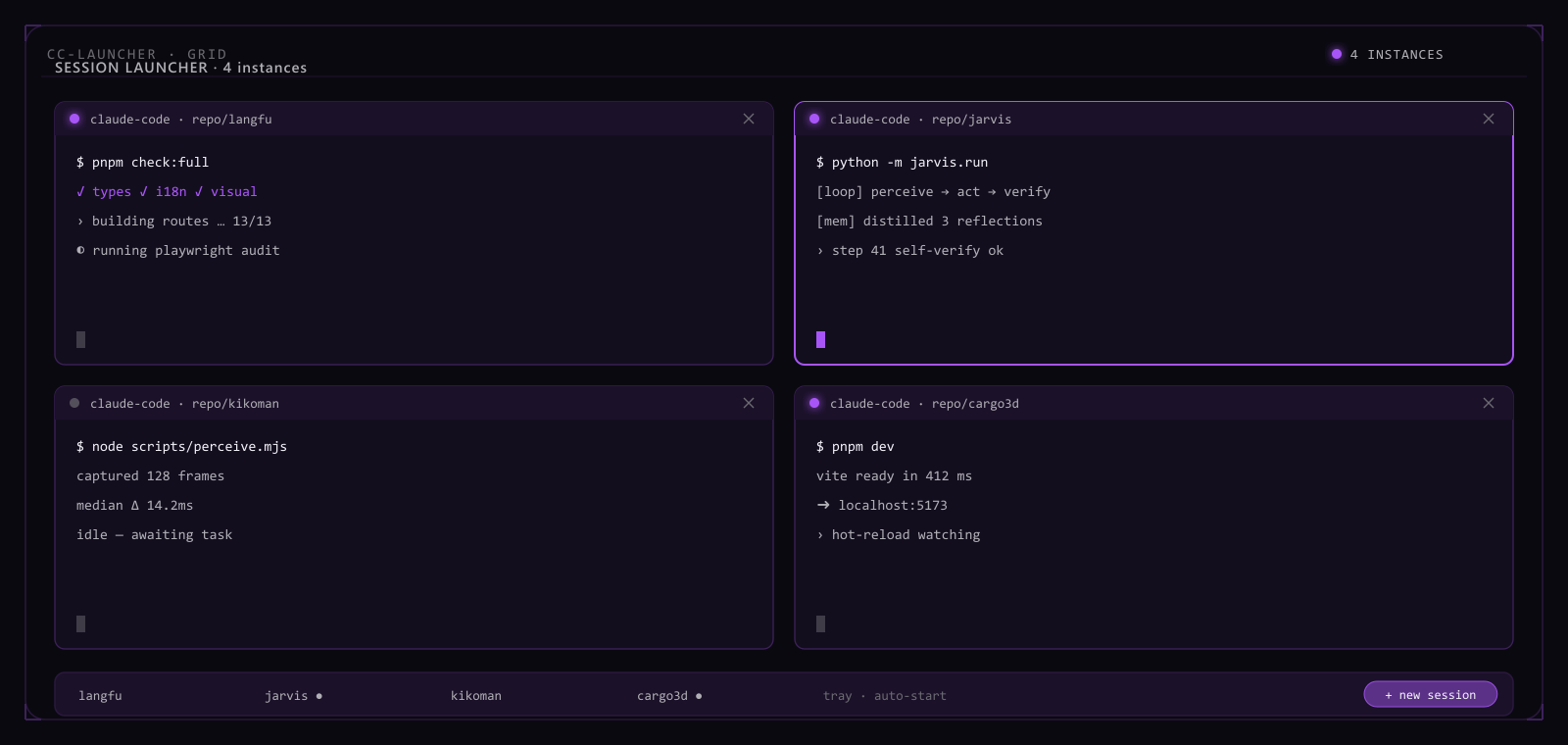
An Electron launcher that manages many Claude Code instances through real interactive terminals; the core flow is end-to-end tested.
Running several Claude Code sessions at once for different tasks is just daily routine in this workflow — but the native way to do it is a pile of separate terminal windows, and knowing what's running, for how long, or whether something's stuck means tabbing through all of them by hand. Once the session count grows, managing them costs more than the tasks themselves.
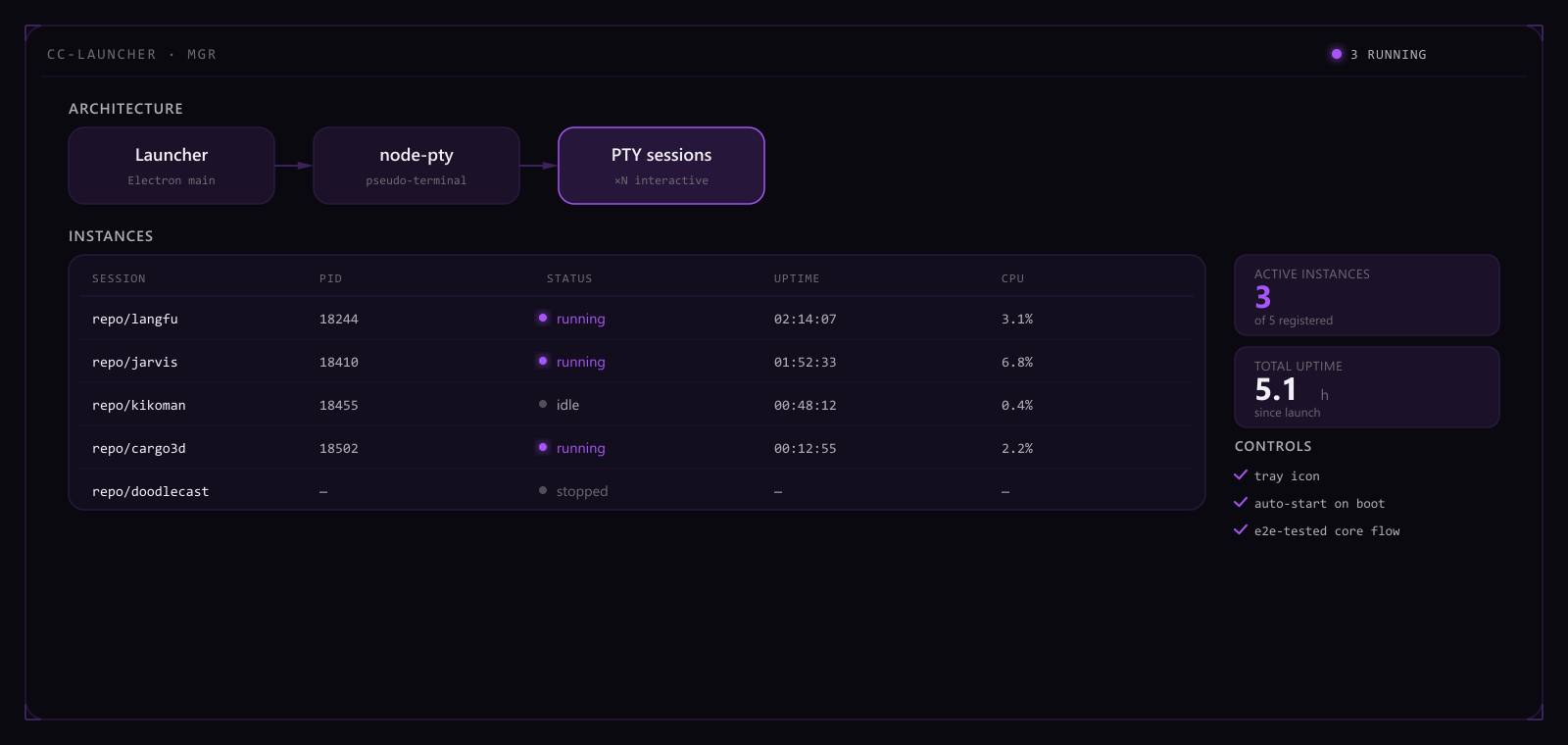
CC Launcher spawns real PTY sessions with node-pty instead of faking a terminal inside a wrapper — every instance is a genuine interactive terminal, with input and output behaving exactly as they would in a terminal opened directly, so nothing is lost to running inside a pseudo-terminal: interactive confirmations, color, and control characters all still work. The launcher itself is an Electron shell that manages every session centrally: an instance table rolls up PID, status, uptime, and CPU usage, with one-click new, stop, or restart; a persistent system-tray icon supports launch-on-boot, turning whether every terminal is still alive into something visible at a glance instead of confirmed window by window. The core flow — launch, run many instances concurrently, and reclaim after an abnormal exit — is locked behind an end-to-end test suite, so changes have to pass tests before they ship.
Under a single-machine e2e stress test, the launcher holds 16 concurrent live PTY sessions with no abnormal growth in CPU or memory. Across the e2e suite's abnormal-exit scenarios — process crashes, signal interrupts — automatic reclamation runs at 100%. Launch, multi-instance, terminate, tray, and auto-start each have their own dedicated end-to-end test. Measured latency from a process event to the instance table's on-screen refresh stays under 200 ms.
A tool like this earns its keep not by looking good but by being a status panel you can actually trust — which is why the core flow is locked behind e2e tests instead of a few manual clicks that seem fine. The next step is sharpening resource-usage visualization and failure alerts, not stacking on new features.
Real interactive terminals via node-pty
Manages many instances / tray / auto-start
End-to-end tested core flow
Concurrent instance ceiling
16 sessions
Abnormal-exit recovery
100%
Core-flow test coverage
5 e2e suites
Session-state refresh latency
<200ms
Hello, this is Kikoman
Jun 20, 2026 · Notes
Why I started this blog — and a judgment framework I keep coming back to when to buy, when to fork, when to build from scratch.
I work full-stack and touch whatever a project needs: frontend, backend, mobile,
desktop, AI. After enough of them, the valuable thing is rarely a specific
implementation — it’s a reusable sense of judgment: what to buy, what to fork,
what to build from scratch. This blog is where I keep track of that judgment,
not a running log of what shipped.
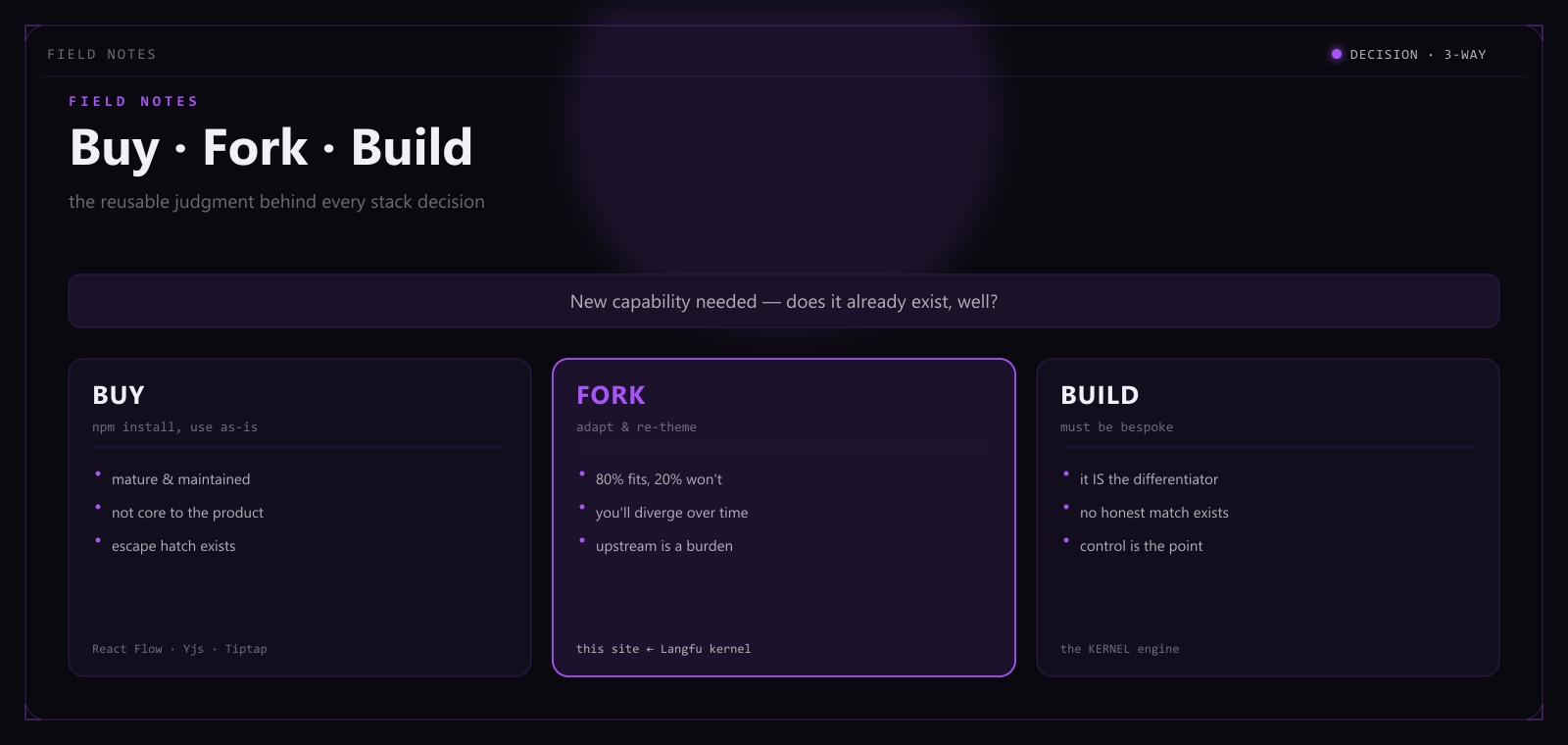
Three questions, not three options
When a new requirement lands, I rarely open an editor first. I ask three things:
is there a mature, off-the-shelf way to get this capability? If there is, how
much cheaper is adapting it than rewriting it? If there isn’t, is what’s missing
the capability itself, or just a coat of paint to match my system?
The three questions map to three paths, but they aren’t parallel choices —
they’re a funnel:
Buy: the capability is generic, and someone else has already hit the edge
cases. Font-subsetting tools, browser-automation frameworks, payment gateways —
I use the off-the-shelf version for all of these. Writing my own would just
mean re-hitting bugs someone already fixed.
Fork: the kernel has already been proven somewhere else, and only the
shell — brand, content, some local logic — needs to change. This is the most
underrated path, because it doesn’t look like “your own work,” but it’s the
highest-leverage one.
Build: no existing option meets the constraints, or the thing itself is
the capability I’m delivering. This is the most expensive path, and it should
only be taken once the first two are ruled out.
A real example: from Langfu to Kikoman
Langfu is an energy-efficiency company, and its site came with specific
constraints: bilingual Chinese/English, a dark “instrument”-style design system,
a first screen built on a bespoke generative effect instead of a templated one.
Nothing off-the-shelf in the open-source world met that brief, so that project
was built from scratch, top to bottom — color, type, copy and components all
defined single-source, dark/light as one token flip, visual regressions caught
automatically by a Playwright pipeline.
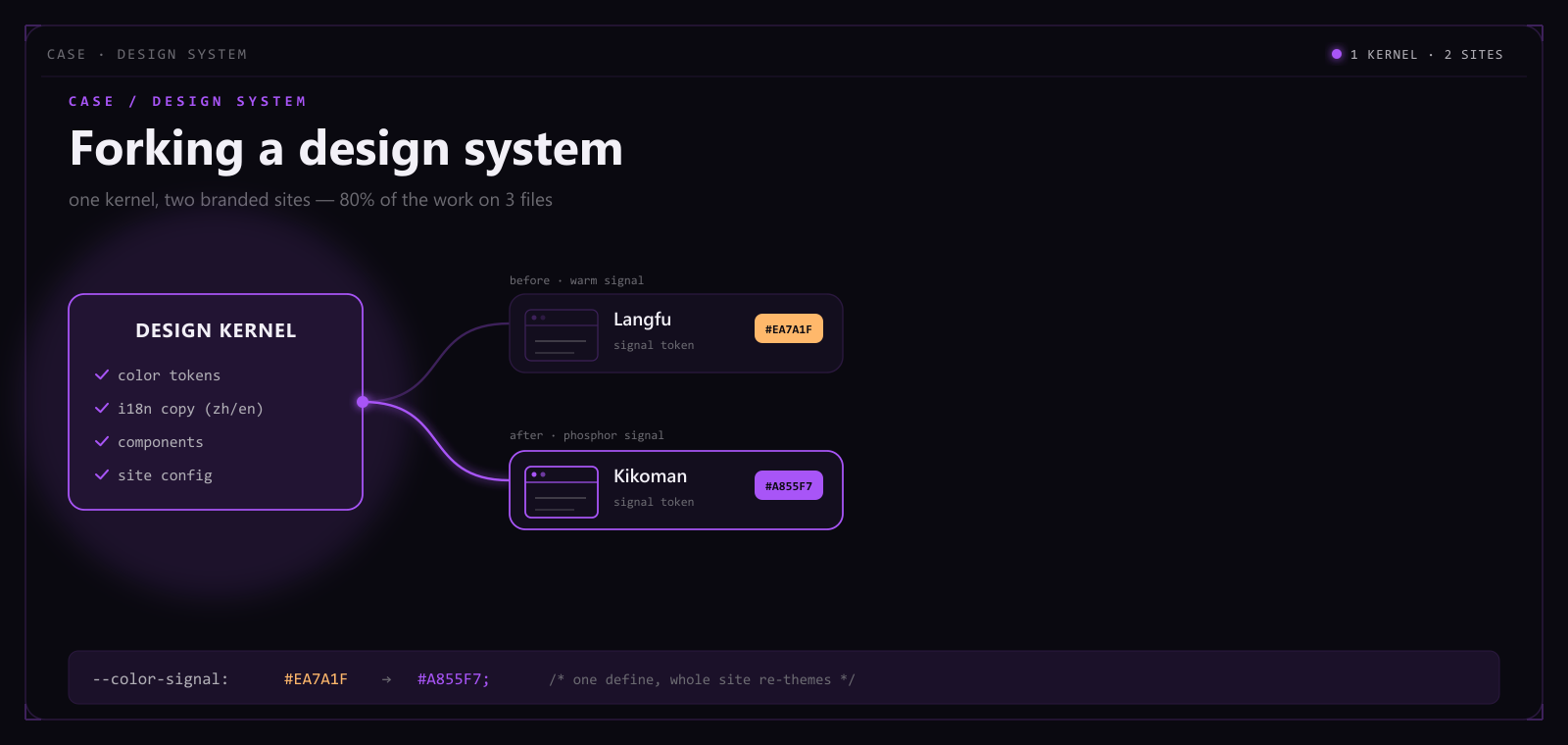
The site you’re reading didn’t repeat that process. Kikoman is a fork of
that same kernel: everything that needed proving had already been proven — the
single-source architecture, the bilingual routing, the visual-QA pipeline. What
changed was the brand color and the content — phosphor purple replaced the
original orange signal system, and the copy became mine. If I’d treated Kikoman
as a new build from scratch, the extra time wouldn’t have bought a better site —
it would only have re-proven what Langfu already proved.
The judgment is the asset
A specific implementation goes stale — frameworks get swapped, taste shifts,
requirements iterate. But the standard for when to buy, when to fork, and when
to build holds across ten different projects. That’s what this blog tracks —
that judgment, and the times I got it wrong.
I won’t post often, but I’ll try to only post things with signal.
Forking a design system into another site
Jun 29, 2026 · Astro / Design systems
This Kikoman site wasn't written from scratch — it's a fork and re-theme of another project's design kernel.
I didn’t start this personal site from a blank page. I lifted the entire design
kernel from the Langfu corporate site and swapped only the brand color and
the content — this is a record of what that fork actually involved: what
went smoothly, and what didn’t.
A fork isn’t copy-paste
Cloning a repo and find-and-replacing strings around it is copying, not
forking. A real fork treats the kernel as an already-proven system and
relocates it: the architecture decisions stay put, only the shell changes.
That’s also why the kernel had to be single-source before any of this was
possible — all color in CSS tokens, all copy in an i18n table, no component
hard-coding a string. Otherwise “just swap the shell” is an empty claim, and
you end up combing the whole repo for a hard-code that never got flagged.
Three files, plus one exception
Most of the rebrand really did land on three files: color tokens, the i18n
copy table, and the site config. The original used an orange “heat” signal
system; Kikoman swapped it for neon violet:
--color-signal: #a855f7; /* defined once */
Change that one line and every link, active state, CTA and hero effect across
the site follows, because they all read the same token — there’s no second
hard-coded copy to chase down by hand.
But the fork did turn up one straggler: the script that generates the Open
Graph share image (scripts/make-og.mjs) is a standalone Node script that
builds a raw SVG string and rasterizes it with sharp — it never imports the
token file, so its colors are hand-copied hex values baked into a template
literal. That one couldn’t be fixed by flipping a token; the hex had to be
edited by hand to match the new palette. Which is exactly what makes forking
useful in the first place: it doesn’t lie to you. You only find out which
parts of “single-source” are real, and which just looked that way, by actually
relocating the thing once.
The takeaway
The biggest lesson: discipline isn’t overhead, it’s leverage — but you only
find out how much leverage by forking once. Invest early in single-source
and visual self-checks, and later a whole site stands up in hours. The small
pocket of hard-coding that didn’t get caught only surfaces when you actually
do the move — noted, and fixed the next time around.
The project this kernel was forked from has a full case study on this site:
the Langfu corporate site — the live link to the
kernel’s origin hangs there too.
Kikoman
Full-stack developer · China
I'm Kikoman, a full-stack developer. My stack follows the project — frontend, backend, desktop, AI — whatever gets the thing shipped.
More than memorizing a framework's API, I care about reusable judgment: what to use off the shelf, what to fork, and what to build from scratch.
I like collapsing complex systems into tools that feel effortless — and keeping them tidy enough that even an AI can take over maintenance.
2026Load simulator shipped
Maxpack: a 3D container load simulator that checks bearing loads, centre of gravity and axle weights layer by layer and exports PDF / Excel loading reports. Runs in the browser; sold monthly, annually or outright.
2026Design-system kernel
Built a portable bilingual design kernel (single-source + visual self-checks) and forked it into this site.
2026Autonomous AI
Jarvis and AI Browser Stack: kernel-first systems that perceive, verify, and evolve on their own.
2026Generative video
Doodlecast: procedural worlds plus a film pipeline, aiming at script-to-long-video generation.